Topology:
DGS-1510-28X (p25) --- (p27) DGS-3420-28SC
(P26) --- (p28)
In this document we will make the LACP configuration between DGS-1510 and DGS-3420 using the ports of 10G, for this we will use the ports # 27 and # 28 of the DGS-3420 and ports # 25 and # 26 the DGS-1510.
Step 1 - LACP configuration in the DGS-3420-28SC
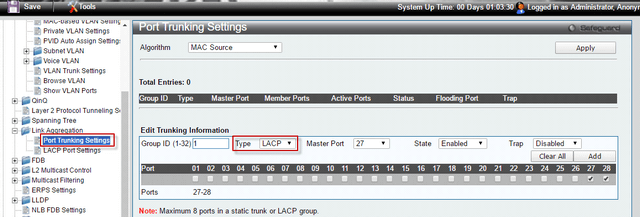
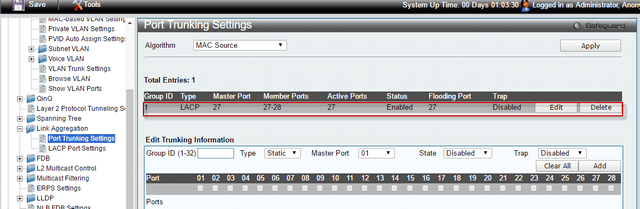
L2 Features > Link Aggregation > Port Trunking Settings
Group ID: 1; Type: LACP; Master Port: 27; Status: Enabled (allow), also click the port 27, 28 then click the “Add” button to create the entry.
Step 2 - LACP configuration in the DGS-1510-28X
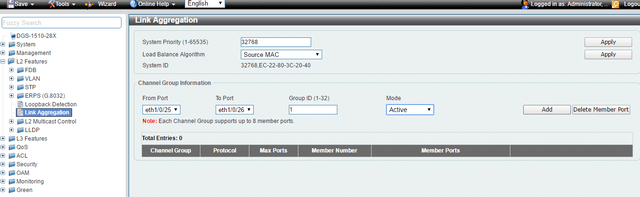
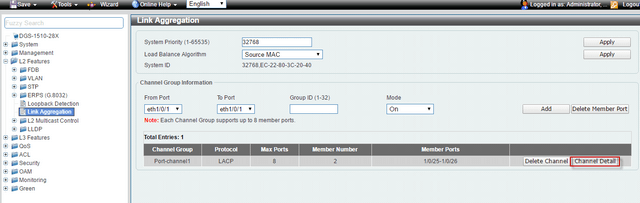
From Port (From the port): eth1 / 0/25; To Port (for port): Eth1 / 0/26; Group ID: 1; Mode: On (Active), then press the "Add" button to create the entry.
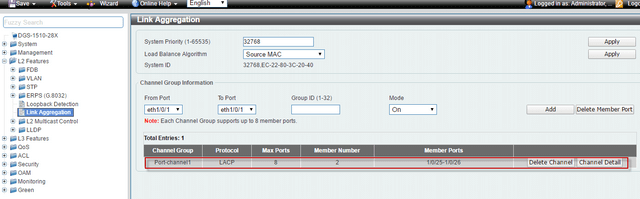
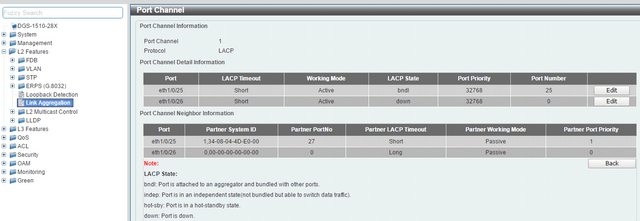
We can check the status of LACP by clicking "Detail channel" after finishing the setting.
Make sure to save changes (on both switches) to NVRAM before you complete any reboots to avoid losing your settings.
Configuration LACP between DGS-1510-Series and DGS-3420-Series using a copper port, the configuration steps are the same as steps for 10G.
(Please refer to the manual for the other details of the LACP configuration).
Note: You cannot add different ports to an aggregated link