Requirements:
-
PC / Laptop / MAC
-
Terminal Emulator – Click here
-
RS232-USB – Console Cable
Once you have the above completed, please continue to
“Environment Setup”
Environment Setup:
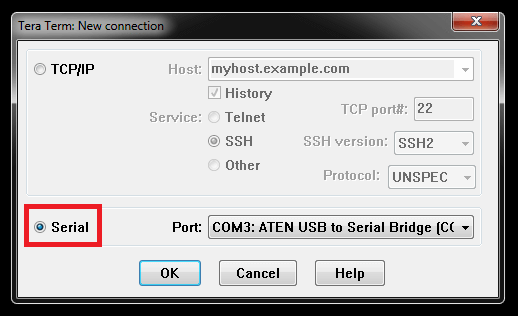
Step 1 – Open Tera Term and setup as follows:
Click to select
“Serial” - (In our example, we have used COM3) – Check your environment to what COM port is used.
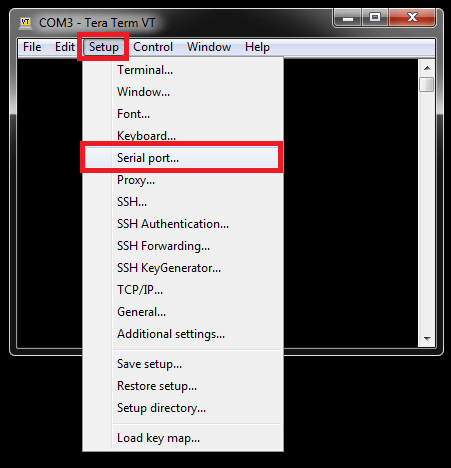
Select -
Setup > Serial port…
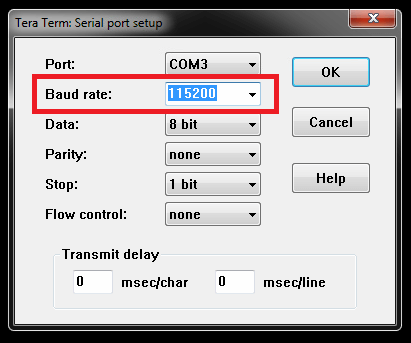
Baud rate: 115200
Once selected as above, click
“OK”
Commands:
Step 2 – Login to your switch
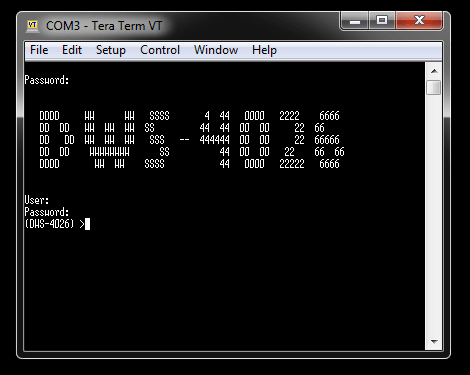
Once you have logged into the switch, enter the following command:
(DWS-4026) >enable
Password: ********
You will be asked for the password, enter this and hit enter key and you should have elevated permissions. Then enter the following command:
(DWS-4026) #show network
Interface Status............................... Up
IP Address..................................... 192.168.1.159
Subnet Mask.................................... 255.255.255.0
Default Gateway................................ 192.168.1.1
IPv6 Administrative Mode....................... Enabled