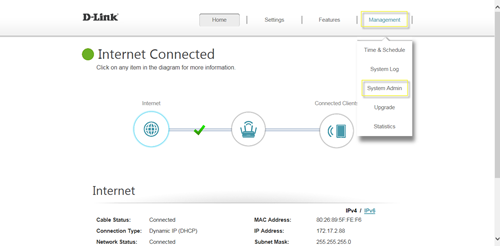
Please launch your browser and enter http://dlinkrouter.local or http://192.168.0.1 into the address bar. Then login and follow the steps below: Step 1: Click Management -> System Admin
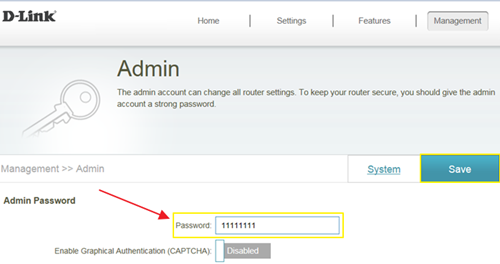
Step 2: Fill in the password you’d like to set and click Save:
Rank: 1.5
867 mensen vonden dit nuttig
Vond u dit nuttig?
867 mensen vonden dit nuttig
Thank you for your feedback.
Sorry we couldn't help! Click here for more FAQs or go to Support.
Dit kan ook interessant zijn:
How do I backup/restore the configuration on my router?Lees antwoord
How do I change the router’s IP address?Lees antwoord
How do I configure the wireless mode (802.11) on my router?Lees antwoord